Testing for the Strawhorse Backdoor in Xcode
On March 10, 2015 by Jonathan ZdziarskiIn the previous blog post, I highlighted the latest Snowden documents, which reveal a CIA project out of Sandia National Laboratories to author a malicious version of Xcode. This Xcode malware targeted App Store developers by installing a backdoor on their computers to steal their private codesign keys.

So how do you test for a backdoor you’ve never seen before? By verifying that the security mechanisms it disables are working correctly. Based on the document, the malware apparently infects Apple’s securityd daemon to prevent it from warning the user prior to exporting developer keys:
“… which rewrites securityd so that no prompt appears when exporting a developer’s private key”
A good litmus test to see if securityd has been compromised in this way is to attempt to export your own developer keys and see if you are prompted for permission.
The Implications of CIA’s Jamboree
On March 10, 2015 by Jonathan ZdziarskiEarly this morning, The Intercept posted several documents pertaining to CIA’s research into compromising iOS devices (along with other things) through Sandia National Laboratories, a major research and development contractor to the government. The documents outlined a number of project talks taking place at a closed government conference referred to as the Jamboree in 2012. The projects listed in the documents included the following pieces.
Rocoto
Rocoto, a chip-like implant that would likely be soldered to the 30-pin connector on the main board, and act like a flasher box that performs the task of jailbreaking a device using existing public techniques. Once jailbroken, a chip like Rocoto could easily install and execute code on the device for persistent monitoring or other forms of surveilance. Upon firmware restore, a chip like Rocoto could simply re-jailbreak the device. Such an implant could have likely worked persistently on older devices (like the 3G mentioned), however the wording of the document (“we will discuss efforts”) suggests the implant was not complete at the time of the talk. This may, however, have later been adopted into the DROPOUTJEEP implant, which was portrayed as an operational product in the NSA’s catalog published several months ago. The DROPOUTJEEP project, however, claimed to be software-based, where Rocoto seems to have involved a physical chip implant.
Strawhorse
Strawhorse, a malicious implementation of Xcode, where App Store developers (likely not suspected of any crimes) would be targeted, and their dev machines backdoored to give CIA injection capabilities into compiled applications. The malicious Xcode variant was capable of stealing the developer’s private codesign keys, which would be smuggled out with compiled binaries. It would also disable securityd so that it would not warn the developer that this was happening. The stolen keys could later be used to inject and sign payloads into the developer’s own products without their permission or knowledge, which could then be widely disseminated through the App Store channels. This could include trojans or watermarks, as the document suggests. With the developer keys extracted, binary modifications could also be made at a later time, if such an injection framework existed.
In spite of what The Intercept wrote, there is no evidence that Strawhorse was slated for use en masse, or that it even reached an operational phase.
NOTE: At the time these documents were reportedly created, a vast majority of App Store developers were American citizens. Based on the wording of the document, this was still in the middle stages of development, and an injection mechanism (the complicated part) does not appear to have been developed yet, as there was no mention of it.
Lenovo’s Domain Record Appears Jacked
On February 25, 2015 by Jonathan ZdziarskiEarly reports came in from Verge that Lenovo was hacked, however upon visiting the website, many reported no problems. Lenovo servers were not, in fact hacked, however it appears that the lenovo.com domain record may have been hijacked. Two whois queries below show that the domain was updated today and its name servers were changed over from
CVF: SPF as a Certificate Validator for SSL
On February 23, 2015 by Jonathan ZdziarskiIn light of recent widespread MiTM goings on with Superfish and Lenovo products, I dusted off an old technique introduced in the anti-spam communities several years ago that would have prevented this, and could more importantly put a giant dent in the capabilities of government sponsored SSL MiTM.
The Core Problem
The core of the problem with SSL is twofold; after all these years, thousands of Snowden documents, and more reason to distrust governments and be paranoid about hackers more than ever, we’re still putting an enormous amount of trust into certificate authorities to:
- Play by the rules according to their own verification policies and never be socially engineered
- Never honor any secret FISA court order to issue a certificate for a targeted organization
- Be secure enough to never be compromised, or to always know when they’ve been compromised
- Never hire any rogue employees who would issue false certificates
Not only are we putting an immense trust in our CAs, but we’re also putting even more trust into our own computers, and that the root certificates loaded into our trust store are actually trustworthy. Superfish proved that to not be the case, however Superfish has only done what we’ve been doing in the security community for years to conduct pen-tests: insert a rogue certificate into the trust store of a device. We’ve done this with iOS, OSX, Windows PCs, and virtually every other operating system as well in conducting pen-tests and security audits.
Sure, there is cert pinning, you say… however in most cases, when it comes to web browsers at least, cert pinning only pins your certificate to a trusted certificate authority. In the case of Superfish’s malware, cert pinning doesn’t appear to have prevented the interception of SSL traffic whatsoever. In fact, Superfish broke the root store so badly, that in some cases, self-signed certificates could even validate! In the case of CAs that have been compromised (either by an adversary, or via secret court orders), cert pinning can also be rendered ineffective, because it still primarily depends on trusting the CA and the root store.
We have existing solid means of validating the chain of trust, but SSL is still missing one core component, and that’s a means of validating with the (now trusted) host itself, to ensure that it thinks there’s nothing fishy about your connection. Relying on the trust store alone is why, after potentially tens of thousands of website visits, none of the web browsers thought to ask, “hey why am I seeing the same cert on every website I visit?”
Superfish Spyware Also Available for iOS and Android
On February 20, 2015 by Jonathan ZdziarskiFor those watching the Superfish debacle unfold, you may also be interested to note that Superfish has an app titled LikeThat available for iOS and Android. The app is a visual search tool apparently for finding furniture that you like (whatever). They also have other visual search apps for pets and other idiotic things, all of which seem to be quite popular. Taking a closer look at the application, it appears as though they also do quite a bit of application tracking, including reporting your device’s unique identifier back to an analytics company. They’ve also taken some rather sketchy approaches to how they handle photos so as to potentially preserve the EXIF data in them, which can include your GPS position and other information.
To get started, just taking a quick look at the binary using ‘strings’ can give you some sketchy information. Here are some of the URLs in the binary:
Lenovo Enabled Wiretapping of Your Computer
On February 19, 2015 by Jonathan ZdziarskiRobert Graham recently uncovered software that came preinstalled on Lenovo computers hiding under the guide of advertising-ware. While the media rushes to understand the technical details behind this, many are making the mistake of chocking it up to some poorly designed advertising / malvertising software with vulnerabilities. This is not the case at all, and it’s important to note that what’s been done here by Lenovo and SuperFish by all accounts is far more serious: a very intentionally designed eavesdropping / surveillance mechanism that allows Lenovo PCs’ encrypted traffic to be wiretapped anywhere it travels on the Internet. We’ll never know the true motives behind the software, but someone went to great lengths to maliciously transform encrypted traffic in a way that allows this electronic wiretapping, then bundled it with new Lenovo computers.
Based on Graham’s notes, and what the media is reporting is commonly referred to as a Man-in-the-Middle attack on the victim’s computer; this is only where the trouble begins. When the user goes to establish an encrypted connection with, say, Bank of America, the SuperFish software pretends that it’s Bank of America right on your computer, by using a phony certificate to masquerade as if it were actually the bank. SuperFish then talks to the real Bank of America using its own private keys to decrypt traffic coming back to it. Where this becomes dangerous is that this transforms the traffic while it’s in transit across the Internet, so that data coming back to the PC is encrypted with a key that SuperFish can decrypt and read.
The threat here goes far beyond that of just the victim’s computer or advertisements: by design, this allows for wiretapping of the PC’s traffic from anywhere it travels on the Internet. In addition to the local MiTM / advertising concerns the media is focusing on, it appears as though the way SuperFish designed their software allows anyone who has either licensed or stolen SuperFish’s private key to intercept and read any encrypted traffic from any affected Lenovo PC across the Internet, without ever having access to the computer. How is this possible? Because SuperFish appears to use the same private keys on every reported installation of the software, according to what Graham’s observed so far.
Waze: Google’s New Spying Tool
On February 16, 2015 by Jonathan ZdziarskiIn 2013, Google acquired Waze, a tool designed to find you the best route while driving. Upon hearing of the application, I thought I’d check it out. Unfortunately, I didn’t get past the privacy policy, which was updated only six months ago. While Waze’s policy begins with “Waze Mobile Limited respects your privacy”, reading the policy demonstrates that they do no such thing.
Interesting note: Waze will not let you view the privacy policy inside the app until you’ve already agreed to let it track your location.
Unique Tracking Identifiers
The first thing I immediately noticed about Waze is that they function in the same way Whisper does: under the false guise of anonymity. The average user would wrongly assume that by not registering an account, their identity remains unknown. Even if you don’t create an account in Waze, the privacy policy states that their software creates a unique identifier on your device to track you; to my knowledge, this is a violation of Apple’s own App Store guidelines, but it seems that Google (and Whisper) have gotten a free pass on this. From the policy:
“If you choose to use the Services without setting up a username you may do so by skipping the username setup stage of the application installation process. Waze will still link all of your information with your account and a unique identifier generated by Waze in accordance with this Privacy Policy.”
I’ve previously written about Whisper and how this technique, combined with multiple GPS data points, can easily identify who you are and where you live, even if the GPS queries are fuzzed. With Google as a parent company, not only is your location information particularly identifying, but cross-referenced with Google data and their massive analytics, could easily determine a complete profile about you including your web search history (interests, fetishes, etc). Even if you don’t have a Google account, any Google searches you’ve done through local IP addresses or applications that track your geolocation can easily be used to link your Waze data to your search history, to your social networking profiles, to virtually any other intelligence Google or its subsidiaries are collecting about you. Simply by using Waze just once, you’ve potentially granted Google license to identify you by GPS or geolocation, and associate an entire web search history with your identity, to de-anonymize you to Google.
Of course, Waze doesn’t come out and admit this; if you read their privacy policy, however, you see that they’ve granted themselves a number of interesting (some nonconventional) rights to your data that make this possible. Perhaps this is why company may have been worth over a billion dollars to Google.
Pawn Storm Fact Check
On February 15, 2015 by Jonathan ZdziarskiFortinet recently published a blog entry analyzing the Pawn Storm malware for iOS. There were some significant inaccuracies, however, and since Fortinet seems to be censoring website comments, I thought I’d post my critique here. Here are a few things important to note about the analysis that were grossly inaccurate.
First of important note is the researcher’s claim that the LSRequiresIPhoneOS property indicates that iPads are not targeted, but that the malware only runs on iPhone. Anyone who understands the iOS environment knows that the LSRequiresIPhoneOS tag simply indicates that the application is an iOS application; this tag can be set to true, and an application can still support iPad and any other iOS based devices (iPod, whatever). I mention this because anyone reading this article may assume that their iPad or iPod is not a potential target, and therefore never check it. If you suspect you could be a target of Pawn Storm, you should check all of your iOS based devices.
Second important thing to note: Most of the information the researcher claims the application gathers can only be gathered on jailbroken devices. This is because the jailbreak process in and of itself compromises Apple’s own sandbox in order to allow applications to continue to run correctly after Cydia has relocated crucial operating system files onto the user data partition. When running Cydia for the first time, several different folders get moved to the /var/stash folder on the user partition. Since this folder normally would not be accessible outside of Apple’s sandbox, the geniuses writing jailbreaks decided to break Apple’s sandbox so that you could run your bootleg versions of Angry Birds. Smart, huh?
A Meta-Data Resilient, Self-Funding “Dark” Internet Mail Idea
On December 30, 2014 by Jonathan ZdziarskiI’m still reading the specs on DIME, but already it’s leaving a bad taste in my mouth. It feels like it’s more or less trying to band-aid an already broken anonymous mail system, that really isn’t anonymous at all, and leaves far too much metadata lying around. Even with DIME, it looks like too much information is still exposed to be NSA proof (like sender and recipient domain names), and with all of the new moving parts, it leaves a rather large attack surface. It feels more as if DIME gives you plausible deniability, but not necessarily NSA proof anonymity, especially in light of TAO, and the likelihood at least one end of the conversation will be compromised or compelled by FISA. I could be wrong, but it at least got me thinking about what my idea of an Internet dark mail system would look like.
Let me throw this idea out there for you. We all want to be able to just write an email, then throw it anonymously into some large vortex where it will magically and anonymously end up in the recipient’s hands, right? What’s preventing that from being a reality? Well, a few things.
What You Need to Know About WireLurker
On November 5, 2014 by Jonathan ZdziarskiMobile Security company Palo Alto Networks has released a new white paper titled WireLurker: A New Era in iOS and OS X Malware. I’ve gone through their findings, and also managed to get a hold of the WireLurker malware to examine it first-hand (thanks to Claud Xiao from Palo Alto Networks, who sent them to me). Here’s the quick and dirty about WireLurker; what you need to know, what it does, what it doesn’t do, and how to protect yourself.
How it Works
WireLurker is a trojan that has reportedly been circulated in a number of Chinese pirated software (warez) distributions. It targets 64-bit Mac OS X machines, as there doesn’t appear to be a 32-bit slice. When the user installs or runs the pirated software, WireLurker waits until it has root, and then gets installed into the operating system as a system daemon. The daemon uses libimobiledevice. It sits and waits for an iOS device to be connected to the desktop, and then abuses the trusted pairing relationship your desktop has with it to read its serial number, phone number, iTunes store identifier, and other identifying information, which it then sends to a remote server. It also attempts to install malicious copies of otherwise benign looking apps onto the device itself. If the device is jailbroken and has afc2 enabled, a much more malicious piece of software gets installed onto the device, which reads and extracts identifying information from your iMessage history, address book, and other files on the device.
WireLurker appears to be most concerned with identifying the device owners, rather than stealing a significant amount of content or performing destructive actions on the device. In other words, WireLurker seems to be targeting the identities of Chinese software pirates.
How App Store Apps are Hacked on Non-Jailbroken Phones
On October 10, 2014 by Jonathan ZdziarskiThis brief post will show you how hackers are able to download an App Store application, patch the binary, and upload it to a non-jailbroken device using its original App ID, without the device being aware that anything is amiss – this can be done with a $99 developer certificate from Apple and [optionally] an $89 disassembler. Also, with a $299 enterprise enrollment, a modified application can be loaded onto any iOS device, without first registering its UDID (great for black bag jobs and the intelligence community).
Why not to rely on self-expiring messaging apps
Now, it’s been known for quite sometime in the iPhone development community that you can sign application binaries using your own dev certificate. Nobody’s taken the time to write up exactly how people are doing this, so I thought I would explain it. This isn’t considered a security vulnerability, although it could certainly be used to load a malicious copycat application onto someone’s iPhone (with physical access). This is more a byproduct of developer signing rights on a device, after it’s been enabled with a custom developer profile. What this should be is a lesson to developers (such as Snapchat, and others who rely on client-side logic) that the client application cannot be trusted for critical program logic. What does this mean for non-technical readers? In plain English, it means that Snapchat, as well as any other self-expiring messaging app in the App Store, can be hacked (by the recipient) to not expire the photos and messages you send them. This should be a no-brainer, but it seems there is a lot of confusion about this, hence the technical explanation.
As a developer, putting your access control on the client side is taboo. Most developers understand that applications can be “hacked” on jailbroken devices to manipulate the program, but very few realize it can be done on non-jailbroken devices too. There are numerous jailbreak tweaks for unlimited skips in Pandora, to prevent Snapchat messages from expiring, and even to add favorites in your mentions on TweetBot. The ability to hack applications is why (the good) applications do it all server-side. Certain types of apps, however, are designed in such a way that they depend on client logic to enforce access controls. Take Snapchat, for example, whose expiring messages require that the client make photos inaccessible after a certain period of time. These types of applications put the end-user at risk in the sense that they are more likely to send compromising content to a party that they don’t necessarily trust – thinking, at least, that the message has to expire.
A Warning to the Tech Community on Abusive Journalists
On October 6, 2014 by Jonathan ZdziarskiBelow is a letter I’ve sent to Royal Media today regarding a journalist who has gone far beyond his ethical and professional boundaries to harass and attack me. Why you ask? Because I didn’t think a particular subject I was researching was credible enough yet to warrant a story. I wanted to bring this to the attention of the tech community as a lesson to be very careful about which journalists you choose to speak with. When you have new findings to share, the choice of which journalists you discuss them with can be harmful if you choose unethical or unprofessional reporters, who are not willing or able to come to an understanding of the details surrounding your work.
Unfortunately, this is not the first time I have had to deal with less than ethical journalists. If you recall, I’ve recently had to deal with a smear campaign from a ZDNet writer, who seemingly used her position in journalism to launch a libelous attack against me, motivated by my religious beliefs (or what she thinks they are), with the full support of the ZDNet staff, who never took any action. Sadly, today, any hack can become a “reporter”, in today’s sense of the word, regardless of what kind of journalism training, or even ethical training, they’ve had. News agencies rarely hold their own writers accountable, especially in tech, where misogyny / misandry thrive, and where personal attacks generate headlines.
Private Photo Vault: Not So Private
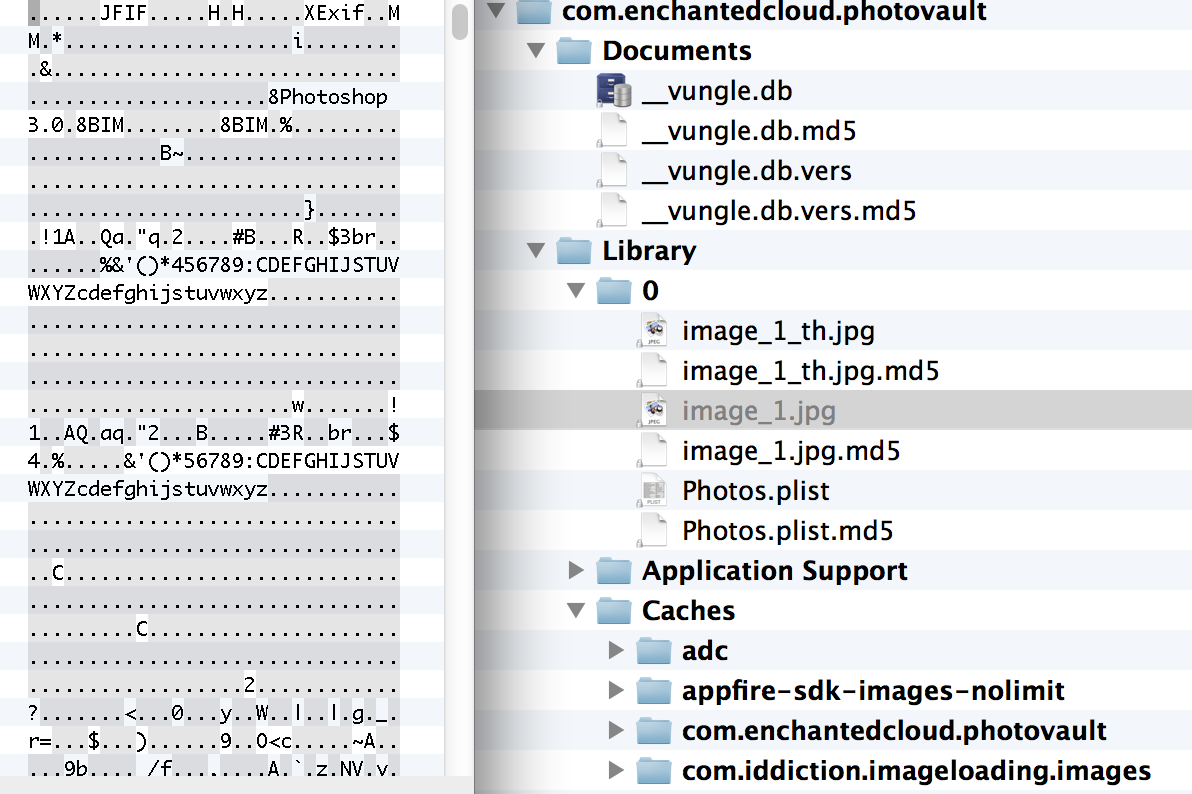
On September 29, 2014 by Jonathan ZdziarskiOne of the most popular App Store applications, Private Photo Vault (Ultimate Photo+Video Manager) claims over 3 million users, and that your photos are “100% private”. The application, however, stores its data files without using any additional protection or encryption than any other files stored on the iPhone. With access to an unlocked device, a pair record from a seized desktop machine, or possibly even just a copy of a desktop or iCloud backup, all of the user’s stored images and video can be recovered and read in cleartext.
Counter-Forensics: Pair-Lock Your Device with Apple’s Configurator
On September 27, 2014 by Jonathan ZdziarskiLast updated for iOS 8 on September 28, 2014
As it turns out, the same mechanism that provided iOS 7 with a potential back door can also be used to help secure your iOS 7 or 8 devices should it ever fall into the wrong hands. This article is a brief how-to on using Apple’s Configurator utility to lock your device down so that no other devices can pair with it, even if you leave your device unlocked, or are compelled into unlocking it yourself with a passcode or a fingerprint. By pair-locking your device, you’re effectively disabling every logical forensics tool on the market by preventing it from talking to your iOS device, at least without first being able to undo this lock with pairing records from your desktop machine. This is a great technique for protecting your device from nosy coworkers, or cops in some states that have started grabbing your call history at traffic stops.
With iOS 8’s new encryption changes, Apple will no longer service law enforcement warrants, meaning these forensics techniques are one of just a few reliable ways to dump forensic data from your device (which often contains deleted records and much more than you see on the screen). Whatever the reason, pair locking will likely leave the person dumbfounded as to why their program doesn’t work, and you can easily just play dumb while trying not to snicker. This is an important step if you are a journalists, diplomat, security researcher, or other type of individual that may be targeted by a hostile foreign government. It also helps protect you legally, so that you don’t have to be put in contempt of court for refusing to turn over your PIN. The best thing about this technique is, unlike my previous technique using pairlock, this one doesn’t require jailbreaking your phone. You can do it right now with that shiny new device.
How to Help Secure Your iPhone From Government Intrusions
On September 27, 2014 by Jonathan ZdziarskiThere’s been a lot of confusion about Apple’s recent statements in protecting iOS 8 data, supposedly stifling law enforcement’s ability to do their job. FBI boss James Comey has publicly criticized Apple, and essentially blamed them for the next hundred children who get kidnapped. While Apple’s new security improvements have made it a lot harder to get to certain types of data, it’s important to note that there are still a number of techniques that can be employed against iOS 8, with varying levels of success. Most of these are techniques that law enforcement is already doing. Some are part of commercial forensics tools such as Oxygen and Cellebrite. The FBI is undoubtedly aware of them. I’ll outline some of the most common ones here.
I’ve included some tips for those of us who are concerned about data security. Security researchers, journalists, law abiding activists, diplomats, and many other types of high profile individuals should all be practicing good data security, especially when abroad. Foreign governments are just as capable of performing the same forensics techniques that our own government is capable of, and there is an overwhelming amount of information suggesting that all of these classes of individuals have been targeted by foreign governments.
Shellshock OpenSSH restricted shell RCE/PE Proof of Concept
On September 26, 2014 by Jonathan ZdziarskiSynopsis:
The sshd daemon used in OpenSSH supports a ForceCommand directive, allowing shell logins to be restricted to specific commands. This is often used in configuring sshd for cvs/git accounts, restricted shells, or management scripts. The ForceCommand directive can be employed system wide, or just for specific users.
Vulnerability:
By default, sshd is configured to allow the LANG environment variable to be pass through prior to execution of the restricted shell. On systems vulnerable to the bash/shellshock vulnerability, LANG can be set in such a way that spawns a remote shell or executes other code on the server, effectively bypassing the forced command and allowing full account access. This can be taken advantage of after the user has authenticated via ssh, and so such systems are only at risk from abuse by their own authorized users, however such users are normally restricted from being able to execute arbitrary commands, and so this is more of a privilege escalation in such cases. This vulnerability can be even more dangerous on systems with open restricted accounts, in which case it becomes an RCE risk.
The Politics Behind iPhone Encryption and the FBI
On September 25, 2014 by Jonathan ZdziarskiApple’s new policy about law enforcement is ruffling some feathers with FBI, and has been a point of debate among the rest of us. It has become such because it’s been viewed as just that – a policy – rather than what it really is, which is a design change. With iOS 8, Apple has finally brought their operating system up to what most experts would consider “acceptable security”. My tone here suggests that I’m saying all prior versions of iOS had substandard security – that’s exactly what I’m saying. I’ve been hacking on the phone since they first came out in 2007. Since the iPhone first came out, Apple’s data security has had a dismal track record. Even as recent as iOS 7, Apple’s file system left almost all user data inadequately encrypted (or protected), and often riddled with holes – or even services that dished up your data to anyone who knew how to ask. Today, what you see happening with iOS 8 is a major improvement in security, by employing proper encryption to protect data at rest. Encryption, unlike people, knows no politics. It knows no policy. It doesn’t care if you’re law enforcement, or a criminal. Encryption, when implemented properly, is indiscriminate about who it’s protecting your data from. It just protects it. That is key to security.
Up until iOS 8, Apple’s encryption didn’t adequately protect users because it wasn’t designed properly (in my expert opinion). Apple relied, instead, on the operating system to protect user data, and that allowed law enforcement to force Apple to dump what amounted to almost all of the user data from any device – because it was technically feasible, and there was nobody to stop them from doing it. From iOS 7 and back, the user data stored on the iPhone was not encrypted with a key that was derived from the user’s passcode. Instead, it was protected with a key derived from the device’s hardware… which is as good as having no key at all. Once you booted up any device running iOS 7 or older, much of that user data could be immediately decrypted in memory, allowing Apple to dump it and provide a tidy disk image to the police. Incidentally, it also allowed a number of hackers (including criminals) to read it.
iOS 8 Protection Mode Bug: Some User Files At Risk of Exposure
On September 24, 2014 by Jonathan ZdziarskiApple’s recent security announcement suggested that they no longer have the ability to dump your content from iOS 8 devices:
“On devices running iOS 8, your personal data such as photos, messages (including attachments), email, contacts, call history, iTunes content, notes, and reminders is placed under the protection of your passcode. Unlike our competitors, Apple cannot bypass your passcode and therefore cannot access this data. So it’s not technically feasible for us to respond to government warrants for the extraction of this data from devices in their possession running iOS 8.”
It looks like there are some glitches in this new encryption scheme, however, and some of the files being stored on your iOS 8 device are not getting encrypted in this way. If you copy files over to your device using iTunes’ “File Sharing” feature or sync videos that appear in the “Home Videos” section of iOS, these files are not getting placed under the protection of your passcode. Theoretically, Apple could dump these in Cupertino, if given your locked iPhone.
Ballistic Has Been Acquired
On September 22, 2014 by Jonathan ZdziarskiTo my fantastic Ballistic customers,
It’s been an incredible six years watching Ballistic grow from a humble trajectory computer to top the charts as the App Store’s most popular field firing system. Ballistic has grown organically – a rarity in this industry – through word of mouth, and nothing more. Not a single penny was ever spent on advertising to grow Ballistic, and yet it’s been featured in the NRA’s rifleman magazine, reviewed in a number of online magazines and blogs, and is now used by many world class competition shoots, military, and police sharpshooters. It has become a trusted name in the industry, and for that I am deeply grateful to all of you who have told your friends about it, and helped support the product with great ideas and requests.
Many of you have been asking me when an Android version is coming, or when other platforms will be supported, or new hardware that’s just now coming out, and are eager to see Ballistic continue to grow in capabilities. There are a lot of great new things that can be done with Ballistic, and I think there’s much more in store. I can’t do all of this alone, though, and so I’ve been in talks over the past few months with a team who has the resources to take the Ballistic suite of products to the next level.
Your iOS 8 Data is Not Beyond Law Enforcement’s Reach… Yet.
On September 17, 2014 by Jonathan ZdziarskiIn a recent announcement, Apple stated that they no longer unlock iOS (8) devices for law enforcement.
“On devices running iOS 8, your personal data such as photos, messages (including attachments), email, contacts, call history, iTunes content, notes, and reminders is placed under the protection of your passcode. Unlike our competitors, Apple cannot bypass your passcode and therefore cannot access this data. So it’s not technically feasible for us to respond to government warrants for the extraction of this data from devices in their possession running iOS 8.”
This is a significantly pro-privacy (and courageous) posture Apple is taking with their devices, and while about seven years late, is more than welcome. In fact, I am very impressed with Apple’s latest efforts to beef up security all around, including iOS 8 and iCloud’s new 2FA. I believe Tim Cook to be genuine in his commitment to user privacy; perhaps I’m one of the few who can see just how gutsy this move with iOS 8 is.
It’s important to take a minute, however, to note that this does not mean that the police can’t get to your data. What Apple has done here is create for themselves plausible deniability in what they will do for law enforcement. If we take this statement at face value, what has likely happened in iOS 8 is that photos, messages, and other sensitive data, which was previously only encrypted with hardware-based keys, is now being encrypted with keys derived from a PIN or passcode. No doubt this does improve security for everyone, by marrying encryption to the PIN (something they ought to have been doing all along). While it’s technically possible to brute force a PIN code, that doesn’t mean it’s technically feasible, and thus lets Apple off the hook in terms of legal obligation. Add a complex passcode into the mix, and it gets even uglier, having to choose any of a number of dictionary style attacks to get into your encrypted data. By redesigning the file system in this fashion (if this is the case), Apple has afforded themselves the ability to say, “the phone’s data is encrypted with a PIN or passphrase, and so we’re not legally required to hack it for you guys, so go pound sand”. I am quite impressed, Mr. Cook! That took courage… but it does not mean that your data is beyond law enforcement’s reach.