Forensics . General
Auditing a Graded Video Game
On November 4, 2021 by Jonathan ZdziarskiAnyone who’s read my blog knows that I am not a fan of video game grading. Grading companies, in my experience, do marginal quality work, and at a superficial level that cannot be audited once an item has been sealed. The holy plastic WATA box is all too often used to convince sellers that their item somehow has more value than it actually does, and buyers the frustration of passing over finds because of greedy sellers who drank the kool-aid. Overall, video game grading has done more harm to the hobby than good.
I was lucky enough to find one seller who must have been frustrated that their VGA graded game hadn’t sold for the inflated prices they were led to believe they could get for it, and so I made a reasonable offer on it based on what an ungraded sealed copy would cost me. They accepted. I decided to use this as an experiment to crack open the enclosure and audit VGA’s work, and thought I’d share my findings so that the community would know what to expect a graded game actually looks like behind the plastic.
Forensics . General
Authenticating Early Nintendo Systems and Games
On September 9, 2021 by Jonathan Zdziarski“How can you have money,” demanded Ford, “if none of you actually produces anything? It doesn’t grow on trees you know.” “If you would allow me to continue.. .” Ford nodded dejectedly. “Thank you. Since we decided a few weeks ago to adopt the leaf as legal tender, we have, of course, all become immensely rich.” Ford stared in disbelief at the crowd who were murmuring appreciatively at this and greedily fingering the wads of leaves with which their track suits were stuffed. “But we have also,” continued the management consultant, “run into a small inflation problem on account of the high level of leaf availability, which means that, I gather, the current going rate has something like three deciduous forests buying one ship’s peanut.” Murmurs of alarm came from the crowd. The management consultant waved them down. “So in order to obviate this problem,” he continued, “and effectively revalue the leaf, we are about to embark on a massive defoliation campaign, and. . .er, burn down all the forests. I think you’ll all agree that’s a sensible move under the circumstances.” The crowd seemed a little uncertain about this for a second or two until someone pointed out how much this would increase the value of the leaves in their pockets whereupon they let out whoops of delight and gave the management consultant a standing ovation. The accountants among them looked forward to a profitable autumn aloft and it got an appreciative round from the crowd.”
Douglas Adams, The Restaurant at the End of the Universe
Ask any frustrated retro-gamer, and they’ll tell you the past couple of years have seen a fake market bubble to jack up game prices. What appear to be credible allegations of fraud and collusion have surfaced between grading companies and auction houses, such as WATA Games and Heritage Auctions, which hopefully will mean fair prices will start to return to a hobby that was previously only frequented by hardcore nerds, rather than investors. But along with this fake gaming bubble came another new phenomenon: fake, high dollar “premium” Nintendo collections. One particular peeve of mine is the introduction of fake “test market” NES sets appearing on auction sites. A “test market” system is a reference to the first hundred thousand units sold as part of a limited release in 1985, before Nintendo knew whether the consoles would be viable. Nobody wanted to carry video games after Atari crashed the market in 1983, and so Nintendo USA, without telling their Japanese parent company, promised retail stores a refund for any unsold systems and a 90 day line of credit. They ended up selling nearly 62 million consoles. Those first 100,000 trial market systems are now considered by collectors to be the Holy Grail.
They’re also fraught with fraud, due to the prices they can fetch, especially if you find one graded. Many fraudulent test market systems include a few genuine components from the original box, but were either missing parts or pieced together. Because they came with the full caboodle – the Zapper, R.O.B., controllers, and two games – a lot of pieces can get lost or broken over time. The replacement parts included at auction often include retail parts from after Nintendo’s worldwide release, severely diminishing their value. Any test market system today could easily include post-release cartridges, light guns, robots, controllers, manuals, boxes, or even circuit boards; buyers and sellers generally believe there’s no way to tell the difference. All too often, someone will buy an empty test market box and throw something together with junk from eBay, selling a $200 system for thousands. In some extreme cases, even the original NES main board would be swapped out for a release board, leaving the only authentic parts the plastic shell! Such fraud can happen with individual games too. These shenanigans ruin the legitimacy and the value of the asset. Fakes have always existed, but with the inflated prices sellers think they can get these days, hobbyists and collectors stand to lose a lot more money than ever thought. Up until recently, test market systems have been considered “a real treat” when found in great condition, but thanks to a manufactured gaming bubble, they’re now fetching big money – and with that comes a lot of people looking to rip you off.
Forensics . Politics . Security
On NCCIC/FBI Joint Report JAR-16-20296
On January 6, 2017 by Jonathan ZdziarskiSocial media is ripe with analysis of an FBI joint report on Russian malicious cyber activity, and whether or not it provides sufficient evidence to tie Russia to election hacking. What most people are missing is that the JAR was not intended as a presentation of evidence, but rather a statement about the Russian compromises, followed by a detailed scavenger hunt for administrators to identify the possibility of a compromise on their systems. The data included indicators of compromise, not the evidentiary artifacts that tie Russia to the DNC hack.
One thing that’s been made clear by recent statements by James Clapper and Admiral Rogers is that they don’t know how deep inside American computing infrastructure Russia has been able to get a foothold. Rogers cited his biggest fear as the possibility of Russian interference by injection of false data into existing computer systems. Imagine the financial systems that drive the stock market, criminal databases, driver’s license databases, and other infrastructure being subject to malicious records injection (or deletion) by a nation state. The FBI is clearly scared that Russia has penetrated more systems than we know about, and has put out pages of information to help admins go on the equivalent of a bug bounty.
Apple . Forensics . Politics . Security
San Bernardino: Behind the Scenes
On November 2, 2016 by Jonathan ZdziarskiI wasn’t originally going to dig into some of the ugly details about San Bernardino, but with FBI Director Comey’s latest actions to publicly embarrass Hillary Clinton (who I don’t support), or to possibly tip the election towards Donald Trump (who I also don’t support), I am getting to learn more about James Comey and from what I’ve learned, a pattern of pushing a private agenda seems to be emerging. This is relevant because the San Bernardino iPhone matter saw numerous accusations of pushing a private agenda by Comey as well; that it was a power grab for the bureau and an attempt to get a court precedent to force private business to backdoor encryption, while lying to the public and possibly misleading the courts under the guise of terrorism.
Apple . Forensics . Security
Hardware-Entangled APIs and Sessions in iOS
On April 26, 2016 by Jonathan ZdziarskiApple has long enjoyed a security architecture whose security, in part, rests on the entanglement of their encryption to a device’s physical hardware. This pairing has demonstrated to be highly effective at thwarting a number of different types of attacks, allowing for mobile payments processing, secure encryption, and a host of other secure services running on an iPhone. One security feature that iOS lacks for third party developers is the ability to validate the hardware a user is on, preventing third party applications from taking advantage of such a great mechanism. APIs can be easily spoofed, as a result, and sessions and services are often susceptible to a number of different forms of abuse. Hardware validation can be particularly important when dealing with crowd-sourced data and APIs, as was the case a couple years ago when a group of students hacked Waze’s traffic intelligence. These types of Sybil attacks allow for thousands of phantom users to be created off of one single instance of an application, or even spoof an API altogether without a connection to the hardware. Other types of MiTM attacks are also a threat to applications running under iOS, for example by stealing session keys or OAuth tokens to access a user’s account from a different device or API. What can Apple do to thwart these types of attacks? Hardware entanglement through the Secure Enclave.
Apple . Forensics . Opinion . Politics . Security
An Open Letter to FBI Director James Comey
On April 7, 2016 by Jonathan ZdziarskiMr. Comey,
Sir, you may not know me, but I’ve impacted your agency for the better. For several years, I have been assisting law enforcement as a private citizen, including the Federal Bureau of Investigation, since the advent of the iPhone. I designed the original forensics tools and methods that were used to access content on iPhones, which were eventually validated by NIST/NIJ and ingested by FBI for internal use into your own version of my tools. Prior to that, FBI issued a major deviation allowing my tools to be used without validation, due to the critical need to collect evidence on iPhones. They were later the foundation for virtually every commercial forensics tool to make it to market at the time. I’ve supported thousands of agencies worldwide for several years, trained our state, federal, and military in iOS forensics, assisted hands-on in numerous high-profile cases, and invested thousands of hours of continued research and development for a suite of tools I provided at no cost – for the purpose of helping to solve crimes. I’ve received letters from a former lab director at FBI’s RCFL, DOJ, NASA OIG, and other agencies citing numerous cases that my tools have been used to help solve. I’ve done what I can to serve my country, and asked for little in return.
First let me say that I am glad FBI has found a way to get into Syed Farook’s iPhone 5c. Having assisted with many cases, I understand from firsthand experience what you are up against, and have enormous respect for what your agency does, as well as others like it. Often times it is that one finger that stops the entire dam from breaking. I would have been glad to assist your agency with this device, and even reached out to my contacts at FBI with a method I’ve since demonstrated in a proof-of-concept. Unfortunately, in spite of my past assistance, FBI lawyers prevented any meetings from occurring. But nonetheless, I am glad someone has been able to reach you with a viable solution.
Apple . Forensics . Politics . Security
Why a Software Exploit Would be a Threat to Secure Enclave Devices
On March 30, 2016 by Jonathan ZdziarskiAs speculation continues about the FBI’s new toy for hacking iPhones, the possibility of a software exploit continues to be a point of discussion. In my last post, I answered the question of whether such an exploit would work on Secure Enclave devices, but I didn’t fully explain the threat that persists regardless.
For sake of argument, let’s go with the theory that FBI’s tool is using a software exploit. The software exploit probably doesn’t (yet) attack the Secure Enclave, as Farook’s 5c didn’t have one. But this probably also doesn’t matter. Let’s assume for a moment that the exploit being used could be ported to work on a 64-bit processor. The 5c is 32-bit, so this assumes a lot. Some exploits can be ported, while others just won’t work on the 64-bit architecture. But let’s assume that either the work has already been done or will be done shortly to do this; a very plausible scenario.
Apple . Forensics . Security
Viability of Software Exploit and SEP Devices
On March 29, 2016 by Jonathan ZdziarskiA number of people have been asking me my thoughts on the viability of a software exploit against Secure Enclave enabled devices, so here’s my opinion:
First, is interesting to note that the way the FBI categorizes this tool’s capabilities is “5c” and “9.0”; namely, hardware model and firmware version. They won’t confirm that it’s the only combination that the tool runs on, but have noted that these are the two factors they’re categorizing it by. This is consistent with how exploit-based forensics tools have functioned in the past. My own forensics tools (for older iPhones) came in different modules that were tailored for a specific hardware platform and firmware version. This is because most exploits require taking Apple’s own firmware and patching it; those patches require slightly different offsets in the kernel (and possibly boot loader). The software to patch is also going to be slightly different for each hardware and firmware combination. So without saying really anything, FBI has kind of hinted that this might be a software exploit. Had this been a hardware attack, such as a NAND mirroring technique, firmware version likely wouldn’t be a point of discussion, as the technique’s feasibility is dependent on hardware revision. This is all conjecture, of course, but is worth noting that the hints are already there.
If the FBI did in fact use a software exploit, the question then becomes one of how viable it is on other platforms. Typically, a software exploit of this magnitude could very well take advantage of vulnerabilities that have long existed in the firmware, making it more than likely that the exploit may also be effective (possibly with a little tailoring) to older versions of iOS. Even if the exploit today was tailored specifically for this device, adjusting offsets and patching slightly different copies of Apple’s firmware is a relatively painless process. A number of open source tools even exist to find and patch the correct bytes in decrypted Apple kernels.
Apple . Forensics . Politics . Security
FBI Breaks Into San Bernardino iPhone
On March 28, 2016 by Jonathan ZdziarskiAs expected, the FBI has succeeded in finding a method to recover the data on the San Bernardino iPhone, and now the government can see all of the cat pictures Farook was keeping on it. We don’t know what method was used, as it’s been classified. Given the time frame and the details of the case, it’s possible it could have been the hardware method (NAND mirroring) or a software method (exploitation). Many have speculated on both sides, but your guess is as good as mine. What I can tell you are the implications.
Apple . Forensics . Politics
My Take on FBI’s “Alternative” Method
On March 24, 2016 by Jonathan ZdziarskiFBI acknowledged today that there “appears” to be an alternative way into Farook’s iPhone 5c – something that experts have been shouting for weeks now; in fact, we’ve been saying there are several viable methods. Before I get into which method I think is being used here, here are some possibilities of other viable methods and why I don’t think they’re part of the solution being utilized:
- A destructive method, such as de-capping or deconstruction of the microprocessor would preclude FBI from being able to come back in two weeks to continue proceedings against Apple. Once the phone is destroyed, there’s very little Apple can do with it. Apple cannot repair a destroyed processor without losing the UID key in the process. De-capping, acid and lasers, and other similar techniques are likely out.
- We know the FBI hasn’t been reaching out to independent researchers, and so this likely isn’t some fly-by-night jailbreak exploit out of left field. If respected security researchers can’t talk to FBI, there’s no way a jailbreak crew is going to be allowed to either.
- An NSA 0-day is likely also out, as the court briefs suggested the technique came from outside USG.
- While it is possible that an outside firm has developed an exploit payload using a zero-day, or one of the dozens of code execution vulnerabilities published by Apple in patch releases, this likely wouldn’t take two weeks to verify, and the FBI wouldn’t stop a full court press (literally) against Apple unless the technique had been reported to have worked. A few test devices running the same firmware could easily determine such an attack would work, within perhaps hours. A software exploit would also be electronically transmittable, something that an outside firm could literally email to the FBI. Even if that two weeks accounted for travel, you still don’t need anywhere near this amount of time to demonstrate an exploit. It’s possible the two weeks could be for meetings, red tape, negotiating price, and so on, but the brief suggested that the two weeks was for verification, and not all of the other bureaucracy that comes after.
- This likely has nothing to do with getting intel about the passcode or reviewing security camera footage to find Farook typing it in at a cafe; the FBI is uncertain about the method being used and needs to verify it. They wouldn’t go through this process if they believed they already had the passcode in their possession, unless it was for fasting and prayer to hope it worked.
- Breaking the file system encryption on one of NSA/CIAs computing clusters is unlikely; that kind of brute forcing doesn’t give you a two week heads-up that it’s “almost there”. It can also take significantly longer – possibly years – to crack.
- Experimental techniques such as frankensteining the crypto engine or other potentially niche edge techniques would take much longer than two weeks (or even two months) to develop and test, and would likely also be destructive.
Apple . Forensics . Security
iOS / OS X and Forensics Trace Leakage
On March 22, 2016 by Jonathan ZdziarskiAs I sit here, trying to be the good parent in reviewing my daughter’s text messages, I have to assume that I’ve made my kids miserable by having a father with DFIR skills. I’m able to dump her device wirelessly using a pairing record and a tool I designed to talk to the phone. I generate a wireless desktop backup, decrypt it, and this somehow makes my kids safer. What bothers me, as a parent, is the incredible trove of forensic artifacts that I find in my children’s data every month. Deleted messages, geolocation information, even drafts and thumbnails that had all been deleted months ago. Thousands of messages sometimes. In 2008, I wrote a small book with O’Reilly named iPhone Forensics that detailed this forensic mess. Apple has made some improvements, but the overall situation has gotten worse since then. The biggest reason the iPhone is so heavily targeted for forensics and intelligence is because of the very wide data recovery surface it provides: it’s a forensics gold mine.
To Apple’s credit, they’ve done a stellar job of improving the security of iOS devices in general (e.g. the “front door”), but we know that they, just like every other manufacturer, is still dancing on the lip of the volcano. Aside from the risk of my device being hacked, there’s a much greater issue at work here. Whether it’s a search warrant, an unlawful traffic stop in Michigan, someone stealing my backups, an ex-lover, or just leaving my phone unlocked on accident at my desk, it only takes a single violation of the user’s privacy to obtain an entire lengthy history of private information that was thought deleted. This problem is also prevalent in desktop OS X.
Apple . Forensics . Politics
On Dormant Cyber Pathogens and Unicorns
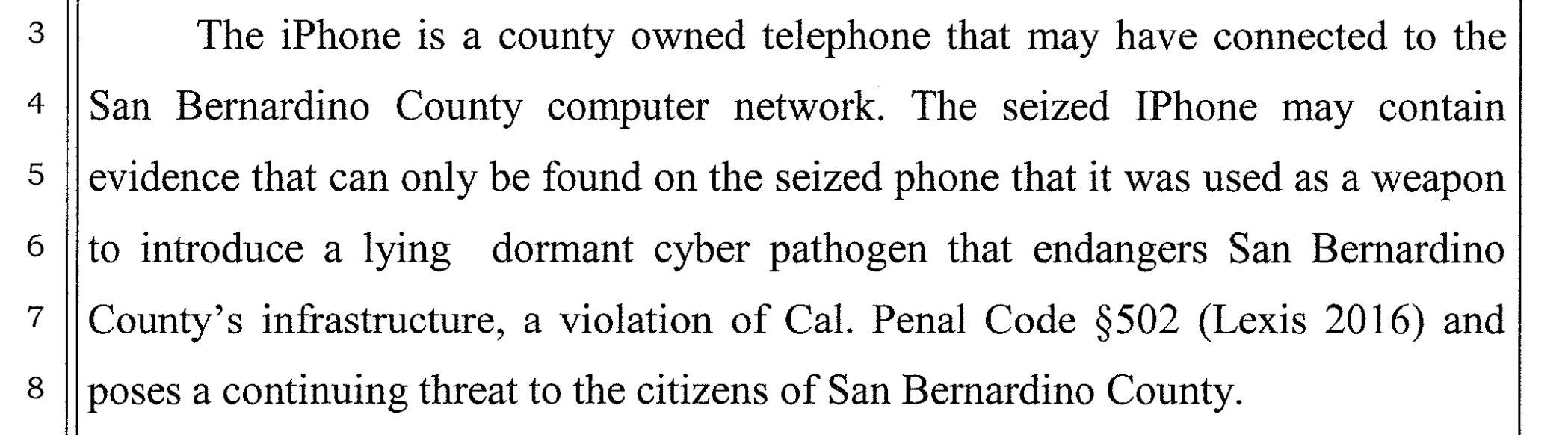
On March 3, 2016 by Jonathan ZdziarskiGary Fagan, the Chief Deputy District Attorney for San Bernardino County, filed an amicus brief to the court in defense of the FBI compelling Apple to backdoor Farook’s iPhone. In this brief, DA Michael Ramos made the outrageous statement that Farook’s phone might contain a “lying dormant cyber pathogen”, a term that doesn’t actually exist in computer science, let alone in information security.
Apple . Forensics . Politics . Security
CIS Files Amici Curiae Brief in Apple Case
On March 3, 2016 by Jonathan ZdziarskiCIS sought to file a friend-of-the-court, or “amici curiae,” brief in the case today. We submitted the brief on behalf of a group of experts in iPhone security and applied cryptography: Dino Dai Zovi, Charlie Miller, Bruce Schneier, Prof. Hovav Shacham, Prof. Dan Wallach, Jonathan Zdziarski, and our colleague in CIS’s Crypto Policy Project, Prof. Dan Boneh. CIS is grateful to them for offering up
Apple . Forensics . Politics
Mistakes in the San Bernardino Case
On March 2, 2016 by Jonathan ZdziarskiMany sat before Congress yesterday and made their cases for and against a backdoor into the iPhone. Little was said, however, of the mistakes that led us here before Congress in the first place, and many inaccurate statements went unchallenged.
The most notable mistake the media has caught onto has been the blunder of changing the iCloud password on Farook’s account, and Comey acknowledged this mistake before Congress.
“As I understand from the experts, there was a mistake made in that 24 hours after the attack where the [San Bernardino] county at the FBI’s request took steps that made it hard—impossible—later to cause the phone to back up again to the iCloud,”
Comey’s statements appear to be consistent with court documents all suggesting that both Apple and the FBI believed the device would begin backing up to the cloud once it was connected to a known WiFi network. This essentially established that I nterference with evidence ultimately led to the destruction of the trusted relationship between the device and its iCloud account, which prevented evidence from being available. In other words, the mistake of trying to break into the safe caused the safe to lock down in a way that made it more difficult to get evidence out of it
Apple . Forensics . Politics . Security
Shoot First, Ask Siri Later
On February 26, 2016 by Jonathan ZdziarskiYou know the old saying, “shoot first, ask questions later”. It refers to the notion that careless law enforcement officers can often be short sighted in solving the problem at hand. It’s impossible to ask questions to a dead person, and if you need answers, that really makes it hard for you if you’ve just shot them. They’ve just blown their only chance of questioning the suspect by failing to take their training and good judgment into account. This same scenario applies to digital evidence. Many law enforcement agencies do not know how to properly handle digital evidence, and end up making mistakes that cause them to effectively kill their one shot of getting the answers they need.
In the case involving Farook’s iPhone, two things went wrong that could have resulted in evidence being lifted off the device.
First, changing the iCloud password prevented the device from being able to push an iCloud backup. As Apple’s engineers were walking FBI through the process of getting the device to start sending data again, it became apparent that the password had been changed (suggesting they may have even seen the device try to authorize on iCloud). If the backup had succeeded, there would be very little, if anything, that could have been gotten off the phone that wouldn’t be in the iCloud backup.
Secondly, and equally damaging to the evidence, was that the device was apparently either shut down or allowed to drain after it was seized. Shutting the device down is a common – but outdated – practice in field operations. Modern device seizure not only requires that the device should be kept powered up, but also to tune all of the protocols leading up to the search and seizure so that it’s done quickly enough to prevent the battery from draining before you even arrive on scene. Letting the device power down effectively shot the suspect dead by removing any chances of doing the following:
Apple . Forensics . Politics . Security
Dumpster Diving in Forensic Science
On February 22, 2016 by Jonathan ZdziarskiRecent speculation has been made about a plan to unlock Farook’s iPhone simply so that they can walk through the evidence right on the device, rather than to forensically image the device, which would provide no information beyond what is already in an iCloud backup. Going through the applications by hand on an iPhone is along the dumpster level of forensic science, and let me explain why.
The device in question appears to have been powered down already, which has frozen the crypto as well as a number of processes on the device. While in this state, the data is inaccessible – but at least it’s in suspended animation. At the moment, the device is incapable of connecting to a WiFi network, running background tasks, or giving third party applications access to their own data for housekeeping. This all changes once the device is unlocked. Now when a pin code is brute forced, the task is actually running from a separate copy of the operating system booted into memory. This creates a sterile environment where the tasks on the device itself don’t start, but allows a platform to break into the device. This is how my own forensics tools used to work on the iPhone, as well as some commercial solutions that later followed my design. The device can be safely brute forced without putting data at risk. Using the phone is a different story.
Apple . Forensics . Politics
10 Reasons Farook’s Work Phone Likely Won’t Have Any Evidence
On February 18, 2016 by Jonathan ZdziarskiTen reasons to consider about Farook’s work phone:
Apple . Forensics . Security
Tl;Dr Notes on iOS 8 PIN / File System Crypto
On June 8, 2015 by Jonathan ZdziarskiHere’s iOS file system / PIN encryption as I understand it. I originally pastebin’d this but folks thought it was worth keeping around. (Thanks to Andrey Belenko for his suggestions for edits).
Block 0 of the NAND is used as effaceable storage and a series of encryption “lockers” are stored on it. This is the portion that gets wiped when a device is erased, as this is the base of the key hierarchy. These lockers are encrypted with a hardware key that is derived from a unique hardware id fused into the secure space of the chip (secure enclave, on A7 and newer chipsets). Only the hardware AES routines have access to this key, and there is no known way to extract it without chip deconstruction.
One locker, named EMF!, stores the encryption key that makes the file system itself readable (that is, directory and file structure, but not the actual content). This key is entirely hardware dependent and is not entangled with the user passcode at all. Without the passcode, the directory and file structure is readable, including file sizes, timestamps, and so on. The only thing not included, as I said. Is the file content.
Another locker, called BAGI, contains an encryption key that encrypts what’s called the system keybag. The keybag contains a number of encryption “class keys” that ultimately protect files in the user file system; they’re locked and unlocked at different times, depending on user activity. This lets developers choose if files should get locked when the device is locked, or stay unlocked after they enter their PIN, and so on. Every file on the file system has its own random file key, and that key is encrypted with a class key from the keybag. The keybag keys are encrypted with a combination of the key in the BAGI locker and the user’s PIN. NOTE: The operating system partition is not encrypted with these keys, so it is readable without the user passcode
There’s another locker in the NAND (what Apple calls the class 4 key, and what we call the DKEY). The DKEY is not encrypted with the user PIN, and in previous versions of iOS (<8), was used as the foundation for encryption of any files that were not specifically protected with “data protection”. Most of the file system at the time used the Dkey instead of a class key, by design. Because the PIN wasn’t involved in the crypto (like it is with the class keys in the keybag), anyone with root level access (such as Apple) could easily open that Dkey locker, and therefore decrypt the vast majority of the file system that used it for encryption. The only files that were protected with the PIN up until iOS 8 were those with data protection explicitly enabled, which did not include a majority of Apple’s files storing personal data. In iOS 8, Apple finally pulled the rest of the file system out of the Dkey locker and now virtually the entire file system is using class keys from the keybag that *are* protected with the user’s PIN. The hardware-accelerated AES crypto functions allow for very fast encryption and decryption of the entire hard disk making this technologically possible since the 3GS, however for no valid reason whatsoever (other than design decisions), Apple decided not to properly encrypt the file system until iOS 8.
Forensics . Security
A Meta-Data Resilient, Self-Funding “Dark” Internet Mail Idea
On December 30, 2014 by Jonathan ZdziarskiI’m still reading the specs on DIME, but already it’s leaving a bad taste in my mouth. It feels like it’s more or less trying to band-aid an already broken anonymous mail system, that really isn’t anonymous at all, and leaves far too much metadata lying around. Even with DIME, it looks like too much information is still exposed to be NSA proof (like sender and recipient domain names), and with all of the new moving parts, it leaves a rather large attack surface. It feels more as if DIME gives you plausible deniability, but not necessarily NSA proof anonymity, especially in light of TAO, and the likelihood at least one end of the conversation will be compromised or compelled by FISA. I could be wrong, but it at least got me thinking about what my idea of an Internet dark mail system would look like.
Let me throw this idea out there for you. We all want to be able to just write an email, then throw it anonymously into some large vortex where it will magically and anonymously end up in the recipient’s hands, right? What’s preventing that from being a reality? Well, a few things.
Apple . Forensics
Private Photo Vault: Not So Private
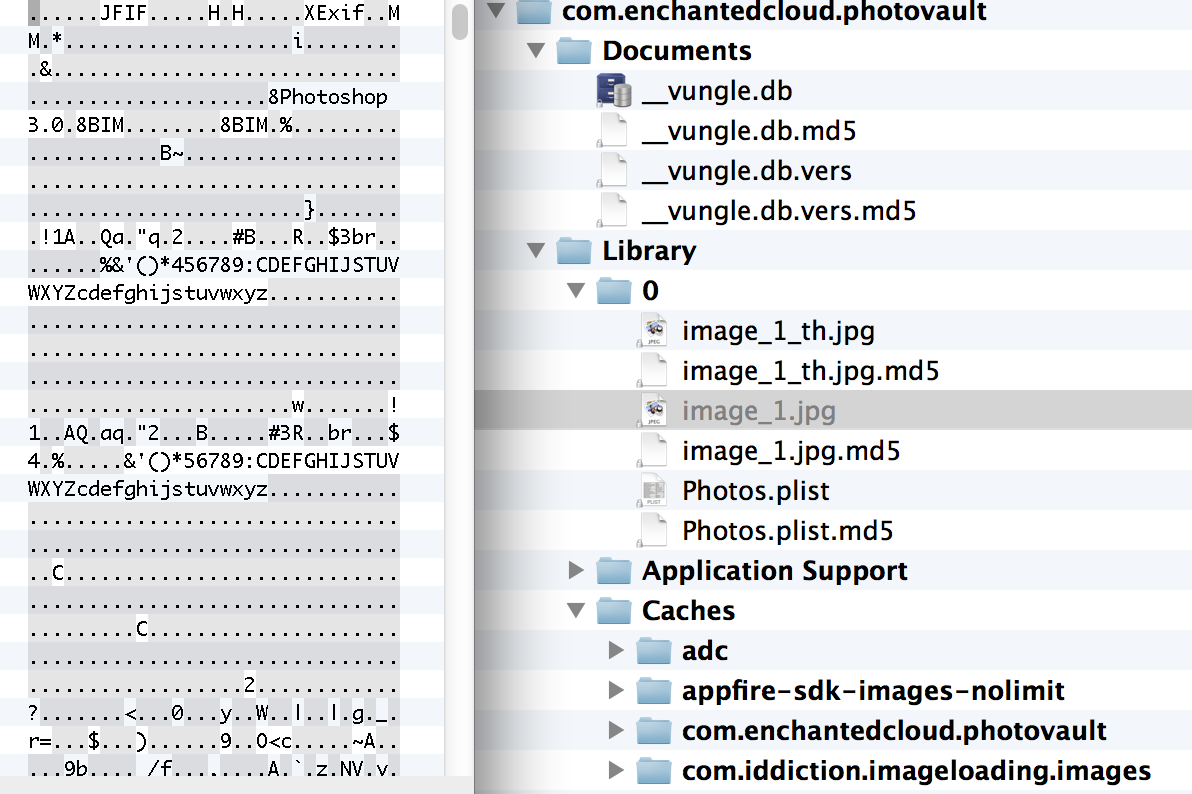
On September 29, 2014 by Jonathan ZdziarskiOne of the most popular App Store applications, Private Photo Vault (Ultimate Photo+Video Manager) claims over 3 million users, and that your photos are “100% private”. The application, however, stores its data files without using any additional protection or encryption than any other files stored on the iPhone. With access to an unlocked device, a pair record from a seized desktop machine, or possibly even just a copy of a desktop or iCloud backup, all of the user’s stored images and video can be recovered and read in cleartext.